

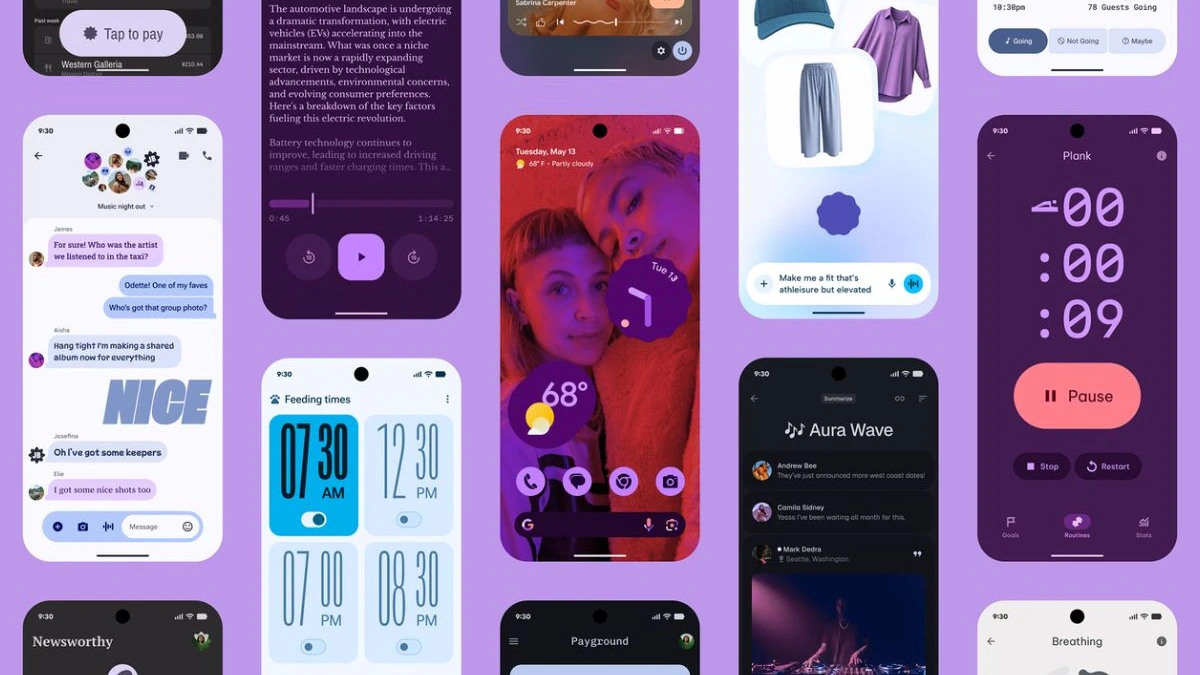
In an exciting move that highlights Google’s ongoing commitment to enhancing user experience, the tech giant has rolled out significant updates to its older Pixel smartphones. These updates introduce the latest Material 3 Expressive Design features, bringing a fresh, modern aesthetic and improved functionality to devices that many users might have thought were nearing the end of their software lifecycle. This strategic update not only revamps the visual interface but also improves usability, accessibility, and personalization, ensuring that even older Pixel phones remain relevant and competitive in an increasingly demanding smartphone market.
Understanding Material 3 and Its Significance
What is Material 3?
Material 3 is Google’s latest design language introduced to create a more dynamic, expressive, and personalized user interface. Building upon the foundations laid by Material Design, Material 3 emphasizes flexibility, accessibility, and user-centric customization. It incorporates more vibrant colors, fluid animations, and adaptive interfaces that respond to user interactions seamlessly. The new design aims to make Android interfaces more engaging and intuitive, providing a cohesive experience across all apps and services.
Why is Material 3 Important for Older Pixel Phones?
Typically, major aesthetic and functional overhauls are reserved for the latest flagship devices. However, Google’s decision to update older Pixel phones with Material 3 features demonstrates a clear commitment to sustainability, user satisfaction, and device longevity. By bringing the latest UI improvements to devices such as Pixel 3, Pixel 4, and Pixel 5, Google ensures a broader user base benefits from visual enhancements and new interactive features, thereby extending the lifespan and relevance of these devices.
Key Features of the Material 3 Expressive Design Update
The update encompasses a broad spectrum of visual and functional improvements. Here’s a detailed breakdown:
- Vibrant and Dynamic Color Schemes: The new UI leverages bold, customizable color palettes that adapt based on user preferences or wallpaper choices, enabling personalized aesthetics for every user.
- Enhanced Typography: Google has refined font styles to improve readability and visual hierarchy, making content easier to read and interact with.
- Fluid Animations and Transitions: Transitions between activities and screens are now smoother, creating a more cohesive and immersive experience.
- Refined Iconography and UI Elements: Icons and buttons have been redesigned for better clarity, accessibility, and aesthetic appeal.
- Personalization Options: Users can now customize UI components more extensively, from wallpapers and themes to icon styles and accent colors.
- Improved Accessibility: Features such as larger touch targets, better contrast ratios, and text scaling make the interface more usable for everyone, including users with visual or motor impairments.
Which Devices Are Eligible for This Update?
Google’s update strategy traditionally favors recent Pixel models, but in this case, many older Pixel phones are getting the upgrade. The devices expected to receive the Material 3 updates include:
- Pixel 3 and Pixel 3 XL
- Pixel 4 and Pixel 4 XL
- Pixel 4a and Pixel 4a 5G
- Pixel 5 and Pixel 5a
- Pixel 6 and Pixel 6 Pro
This move ensures that users of these aged models benefit from the latest UI design and features without needing to upgrade hardware. It’s a testament to Google’s dedication to providing ongoing support and enhancing device longevity.
How to Get the Update?
Ensuring Your Pixel is Ready
Most updates are rolled out in phases through OTA (Over-The-Air) updates. To check for the latest update manually:
- Go to Settings
- Select System
- Tap on Software update
- If available, download and install the update
What to Expect During the Update?
Typically, the update process is smooth, but users are advised to ensure their device has sufficient battery life and stable internet connectivity before proceeding. After the update, you’ll notice:
- A more colorful and lively interface
- Enhanced animations and transitions
- Customizable themes and layouts
- Improved accessibility features
Benefits of the Material 3 Update for Users
This update offers multiple tangible benefits:
- Enhanced Visual Appeal: A modern look that aligns with the latest Android aesthetics.
- Improved User Experience: Smoother animations and more intuitive interactions.
- Better Personalization: Greater control over themes and UI components.
- Increased Accessibility: More inclusive design features.
- Extended Device Lifespan: Keeping older devices up-to-date with current UI trends and features.
Potential Limitations and Considerations
While the update is a positive development, some users might encounter issues such as:
- Minor bugs or glitches post-update, which Google typically addresses through quick patches.
- Battery drain or performance hiccups in some cases, depending on the device’s hardware capabilities.
- Limitations on certain customization options based on device hardware or regional restrictions.
Users are advised to keep backups before updating and to ensure their devices are connected to reliable Wi-Fi networks.
Looking Ahead: What This Means for Android Ecosystem
Google’s decision to roll out Material 3 features to older Pixel phones signifies a shift towards more sustainable software support. It indicates a future where device obsolescence is less tied to outdated software and more focused on hardware capabilities. Additionally, it sets a precedent for manufacturers and OS developers to extend support and updates, fostering a more inclusive and long-lasting Android ecosystem.
Community and User Reactions
The response from Pixel users has been largely positive, appreciating the fresh look and new features. Tech enthusiasts and beta testers have highlighted the improved aesthetics and smoother UI, praising Google for its commitment to conserving older devices while enhancing user experience.
Conclusion
Google’s rollout of Material 3 expressive design features to older Pixel phones underscores a thoughtful approach to software innovation and user satisfaction. It offers a compelling reason for users to stay engaged with their existing devices while enjoying the latest visual and functional upgrades. As Android continues to evolve, such updates reflect Google’s dedication to performance, personalization, and sustainability in the mobile ecosystem.
In summary:
- Major visual and functional enhancements: Vibrant colors, smooth animations, customizable themes.
- Wide device support: Older Pixel models are now part of the update strategy.
- Easy update process: Manual checks can ensure users get the latest features quickly.
- Enhanced user experience and device longevity: Better visuals, accessibility, and personalization.
This development marks a significant milestone in making Android devices more adaptable and significant for longtime users, promising a more dynamic and inclusive future.
For more updated news please keep visiting Hourly Prime News.